This week I attended a short demo / training session by Snowflake ❄️ on their newer AI features: mostly Snowflake Intelligence and Cortex.
I wrote some notes about my experience, so less of a product tour, more of a first impression from a data practitioner trying to understand what is actually usable.
The basic idea is straightforward: Snowflake wants to provide a native LLM layer, directly connected to your data warehouse. Depending on the feature, this means natural-language questions over structured data, semantic search over documents, text classification, or small data apps built close to the data.
That direction makes sense. If the data already lives in Snowflake, there is an obvious appeal in not having to move everything elsewhere just to add a chatbot or a RAG layer on top.
They leverage several providers: Meta (Llama), Anthropic (Claude), Mistral, OpenAI (ChatGPT, Codex), plus some in-house models.

Snowflake Intelligence: chat over data, with a semantic layer in the middle
Snowflake Intelligence looks, at first glance, like the now-standard "chat with your data" interface. You ask questions in natural language, and the system can generate SQL, return tables, and produce simple charts.
So far, so familiar.
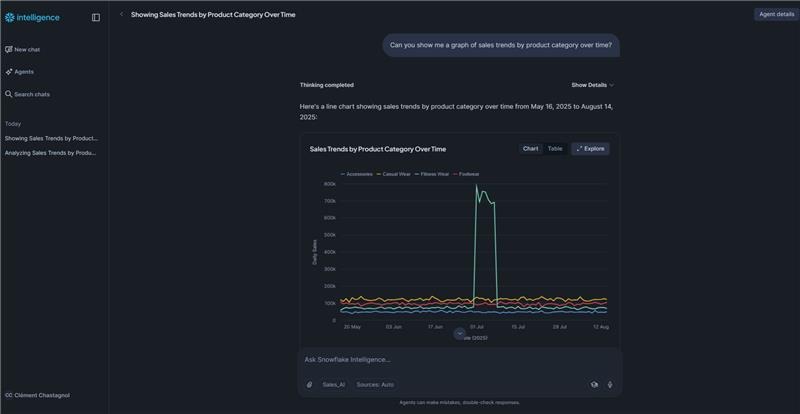
But in practice it's not straightforward. You're not letting an agent loose on arbitrary tables and hoping for the best. Before you can ask a question, you need to follow several steps, whose interest is not clearly explained to the user: create a "Semantic View", then an "Analyst agent" based on this view, then explicitely choose the exposed tables, and most importantly define how relate to each other.
This is an important point: the system does not automatically infer arbitrary joins on its own, and that is probably a good thing. Letting an LLM generate free-form analytical SQL over a real warehouse sounds like a great way to burn credits, create join explosions, saturate a cluster, and produce confidently wrong answers.
Without that preparation, the tool is quickly limited.
After the demo, I discussed this point with a Snowflake Solutions Engineer to check that I had understood correctly. The answer was essentially: yes, you need to pre-chew the work. Define the relationships, explicitely restrict the scope, and give the model a controlled analytical surface.
There is some help from Snowflake when creating semantic views: it can suggest relationships, but they still need to be reviewed and validated. That feels like the right compromise.
My takeaway: Snowflake Intelligence is not "ask anything about all your data". It is closer to "ask reasonable questions on a well-prepared subset of the data". So workable, but it depends a lot on the quality of the semantic model you provided.
Cortex Search: RAG inside Snowflake
The second feature I tested was Cortex Search, Snowflake’s semantic search / RAG building block.
The usual ingredients are there:
- indexing (the classic process in search engines where a
{word: [doc1, doc3...] ...}mapping is built), - vectorization (transforming a text document into a numerical vector, so it can be used by AI),
- and semantic search over text documents (such as support tickets, call transcripts, or internal documentation).
I was not blown away by the results on the demo dataset. But to be fair, the dataset itself was not very convincing: many records were close to duplicates, so it was hard to judge the actual quality of retrieval. I also didn't see a lot of knobs to fine-tune the indexing or embedding processes.
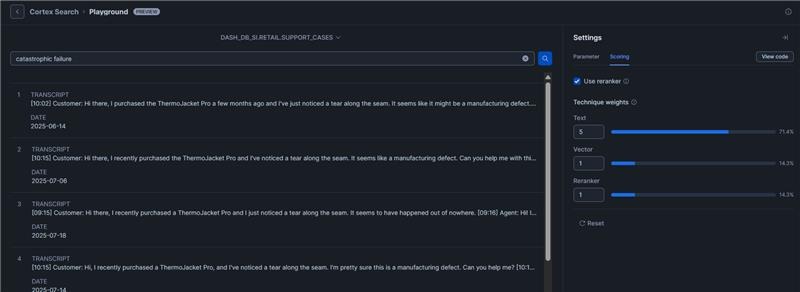
What I found more interesting is the integration into SQL workflows. Once the search/indexing layer exists, you can use Cortex functions directly in queries, for example to classify text records into business categories.
At the time of the demo, the example used SNOWFLAKE.CORTEX.CLASSIFY_TEXT, roughly like this:
SNOWFLAKE.CORTEX.CLASSIFY_TEXT(
  CONCAT(TITLE, ' ', TRANSCRIPT),
  [
    'Product Defects',
    'Returns & Refunds',
    'Usage Questions',
    'Shipping Issues',
    'Size/Fit Issues',
    'General Support'
  ]
) AS issue_category
I should add a caveat: Snowflake’s AI APIs are moving quickly, so this is more a snapshot of what I tested than a reference implementation.
Still, the idea is strong. For enrichment tasks (classify tickets, tag transcripts, route messages, extract themes from unstructured text) having these primitives close to the warehouse is very practical.
I would not expect miracles out of the box though. I would expect useful plumbing.
Streamlit in Snowflake: probably the most concrete entry point
The most concrete part of the session, for me, was not the chatbot. It was using Streamlit inside Snowflake to build a small data application connected to warehouse data.
The basic pattern is simple: get the active Snowpark session, query data, and build a small UI around it.
from snowflake.snowpark.context import get_active_session

session = get_active_session()
df = session.sql("SELECT * FROM my_table").to_pandas()
From there, you can use normal Python visualization libraries to build something more specific and interactive than the default charts available in Snowflake worksheets or chatbot responses.
This felt like the best immediate entry point: not because it is spectacular, but because the use case is clear. You have data in Snowflake. You want a small app for exploration, monitoring, search, classification review, or internal tooling. Streamlit gets you there without building a separate deployment pipeline.
The downside is the constrained environment. Python versions and library versions are controlled (Python 3.11 at most), and the ecosystem feels more frozen than a local setup. That is understandable for a managed platform, but it matters if you are used to moving fast with your own Python environment.
My practical read
My overall impression was positive, but not breathless.
The integration of AI features into Snowflake is coherent. It is not revolutionary, and it does not remove the hard parts. But it gives data teams a set of primitives that fit naturally inside the warehouse:
- semantic models for controlled natural-language analytics;
- search and retrieval over text;
- AI functions for enrichment and classification;
- Streamlit apps close to the data.
The catch is that the chatbot framing can be misleading. The serious work is still data modeling, governance, access control, query constraints, evaluation, and cost control.
In other words: the model is not the product. The system around the model is the product.
For now, my hierarchy would be:
- Streamlit in Snowflake for concrete internal tools and focused data apps.
- Cortex functions / Cortex Search for enrichment and semantic search over unstructured data.
- Snowflake Intelligence once there is a well-designed semantic layer and a bounded analytical use case.
So I would not pitch this internally as "now anyone can chat with all our data". That is the dangerous, expensive, disappointing version.
I would pitch it as: we can expose a carefully modeled slice of the data, add some AI-powered enrichment where it makes sense, and build small applications directly where the data already lives.
I'll leave you with a few resources:
- the Github repo used for the demo (also containing the necessary data) is here;
- the AI features are documented here;
- if you want to reproduce the training session, there's a tutorial to interact with a chatbot and ask for graphs on pre-configured data here, and another one to build a search app there.


